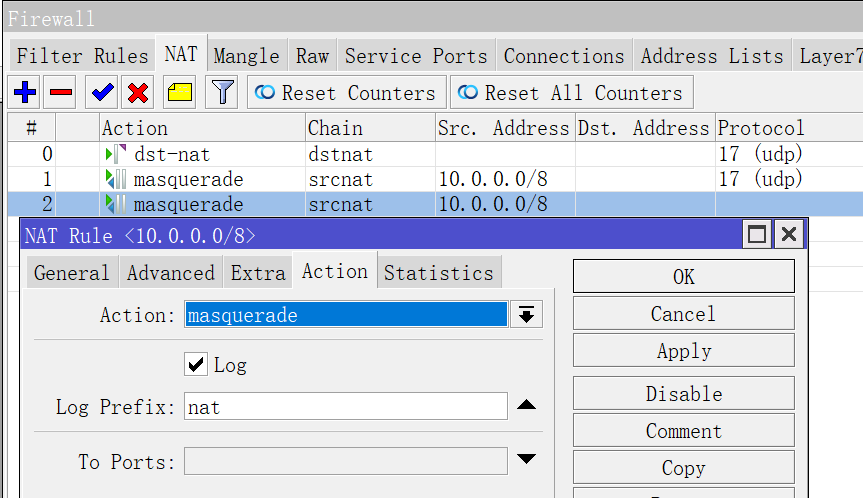
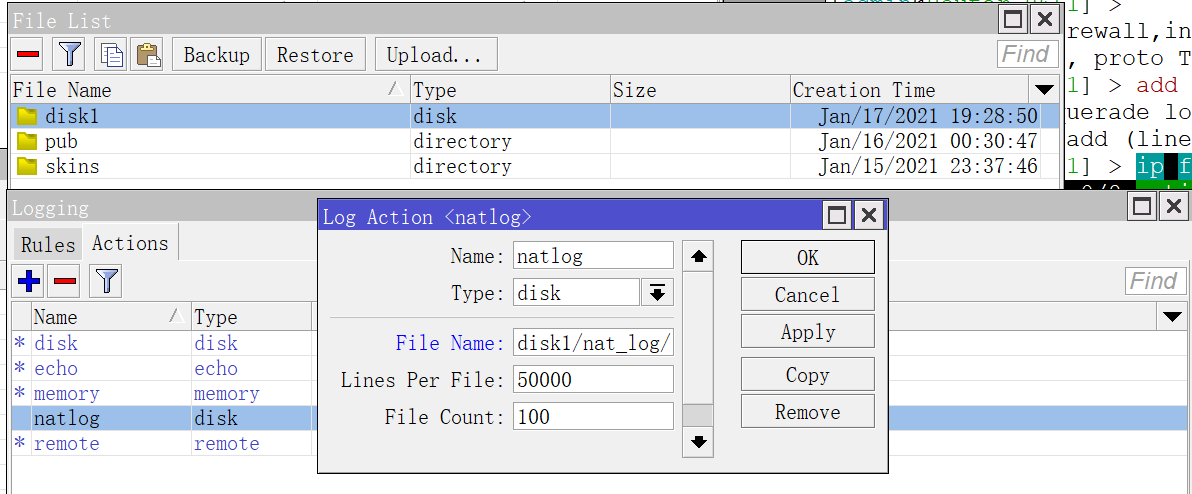
jan/17/2021 19:35:40 firewall,info nat: nat srcnat: in:(unknown 0) out:ether2, src-mac 2e:7f:1c:e3:a9:18, proto

19:43:03 echo: firewall,info nat: nat srcnat: in:(unknown 0) out:ether2, src-mac 2e:7f:1c:e3:a9:18, proto UDP,

10.0.0.3:51258->1.1.1.1:53, NAT 10.0.0.3:51258->(213.133.98.98:53->1.1.1.1:53), len 73

19:43:03 echo: firewall,info nat: nat srcnat: in:(unknown 0) out:ether2, src-mac 2e:7f:1c:e3:a9:18, proto UDP,

10.0.0.3:43433->1.1.1.1:53, NAT 10.0.0.3:43433->(213.133.98.98:53->1.1.1.1:53), len 60

19:43:03 echo: firewall,info nat: nat srcnat: in:(unknown 0) out:ether2, src-mac 2e:7f:1c:e3:a9:18, proto UDP,

10.0.0.3:49361->1.1.1.1:53, len 61

19:43:03 echo: firewall,info nat: nat srcnat: in:(unknown 0) out:ether2, src-mac 2e:7f:1c:e3:a9:18, proto UDP,

10.0.0.3:55716->1.1.1.1:53, len 61

19:43:06 echo: firewall,info nat: nat srcnat: in:(unknown 0) out:ether2, src

10.0.0.3:48121->1.1.1.1:53, len 72

19:43:07 echo: firewall,info nat: nat srcnat: in:(unknown 0) out:ether2, src

10.0.0.3:36238->1.1.1.1:53, NAT 10.0.0.3:36238->(213.133.98.98:53->1.1.1.1:5

19:43:07 echo: firewall,info nat: nat srcnat: in:(unknown 0) out:ether2, src

10.0.0.3:43510->1.1.1.1:53, len 73

19:43:07 echo: firewall,info nat: nat srcnat: in:(unknown 0) out:ether2, src

10.0.0.3:38589->1.1.1.1:53, len 71

19:43:07 echo: firewall,info nat: nat srcnat: in:(unknown 0) out:ether2, src

10.0.0.3:59520->1.1.1.1:53, len 71

19:43:08 echo: firewall,info nat: nat srcnat: in:(unknown 0) out:ether2, src

10.0.0.3:55957->1.1.1.1:53, NAT 10.0.0.3:55957->(213.133.98.98:53->1.1.1.1:5

19:43:08 echo: firewall,info nat: nat srcnat: in:(unknown 0) out:ether2, src

10.0.0.3:55026->1.1.1.1:53, len 61

19:43:08 echo: firewall,info nat: nat srcnat: in:(unknown 0) out:ether2, src

10.0.0.3:42986->1.1.1.1:53, len 61

19:43:09 echo: firewall,info nat: nat srcnat: in:(unknown 0) out:ether2, src

10.0.0.3:48052->1.1.1.1:53, NAT 10.0.0.3:48052->(213.133.98.98:53->1.1.1.1:5

19:43:09 echo: firewall,info nat: nat srcnat: in:(unknown 0) out:ether2, src

10.0.0.3:59710->1.1.1.1:53, NAT 10.0.0.3:59710->(213.133.98.98:53->1.1.1.1:5

19:43:09 echo: firewall,info nat: nat srcnat: in:(unknown 0) out:ether2, src

10.0.0.3:55766->1.1.1.1:53, NAT 10.0.0.3:55766->(213.133.98.98:53->1.1.1.1:5

19:43:14 echo: firewall,info nat: nat srcnat: in:(unknown 0) out:ether2, src-mac 2e:7f:1c:e3:a9:18, proto UDP

, 10.0.0.3:47882->1.1.1.1:53, NAT 10.0.0.3:47882->(213.133.98.98:53->1.1.1.1:53), len 72

19:43:15 echo: firewall,info nat: nat srcnat: in:(unknown 0) out:ether2, src-mac 2e:7f:1c:e3:a9:18, proto UDP

, 10.0.0.3:42274->1.1.1.1:53, len 61

19:43:15 echo: firewall,info nat: nat srcnat: in:(unknown 0) out:ether2, src-mac 2e:7f:1c:e3:a9:18, proto UDP

, 10.0.0.3:42562->1.1.1.1:53, len 61

19:43:18 echo: firewall,info nat: nat srcnat: in:(unknown 0) out:ether2, src-mac 2e:7f:1c:e3:a9:18, proto UDP

, 10.0.0.3:45822->1.1.1.1:53, NAT 10.0.0.3:45822->(213.133.98.98:53->1.1.1.1:53), len 61